Re: The official Babyface Pro Thread
We would like to get the unit for examination. Returning it to the dealer I am not sure we will ever know which one that is. That's why contacting the distributor would be much appreciated.
Matthias Carstens
RME
You are not logged in. Please login or register.
RME User Forum → FireWire & USB series → The official Babyface Pro Thread
We would like to get the unit for examination. Returning it to the dealer I am not sure we will ever know which one that is. That's why contacting the distributor would be much appreciated.
I am not sure to understand. You want me to contact SCV Hitech Audio (french importer)?
Actually the shop (www.univers-sons.com) insisted that I bring the unit back to them today.
I have noted the serial if it might help.
I made a quick video, I will try to upload it somewhere in order for you to see what I am talking about. Once again this is not a very big deal, I just had to press the button in the right corner (upper left) to avoid miss clicks. But when you get used to RME high standard manufacturing you become a bit picky ![]()
Can you tell us about the latency performance? If I was in the market for an HDSPe AIO would the performance of the Babyface Pro be comparable in terms of latency?
Also, in terms of the converters. Are these latest generation converters a step up from something like the AIO?
Both questions yes.
I will probably be but just to make sure. Does the USB connection support the 24/192hz Freq? Not that I it need that high but I do like 24/96 for recording. Most info in the details refer to the ADAT or Spdif I/O when 24/192 is mentioned.
Thanks
Yes it does.
My dealer just called to tell me that the distributor will send back my unit to them because they don't see any issue with it. They aknowledge that the buttons can misclick but it is not really an issue since we just need to push them hard. I am not sure what to do now.
@rexet
I personally test your BFP and there was nothing wrong. I've compare with the two other units we have for demos and press and it was exactly the same feeling.
But I just want to share my experience. I think the strange feeling you have with "Select" button is because there is 4 positions and not only 3 when you select an input for instance. The cycle with the "Select" button is channel 1, channel 2, both channels, no selection. In fact, in some cases you have to click two times to select the channel 1 (no selection > channel 1), depending where you are in the cycle.
My 2 cents
I just got my Babyface Pro back from the shop.
Since Megalobass (I guess you are a SCV Hitech employee?) says it is the same feeling that his two other units I guess this is part of the unit general design and manufacturing.
I am well aware of the cycle of the buttons and I can assure you that I am able to make the button clicks without the function being called. When I have a chance I will make a clear video to show what I mean and Matthias will be then able to tell us more about it.
Thanks
As promised here is a quick video I just made now with my Babyface Pro I got back from the shop today:
https://youtu.be/Iw4EHcUUmG4
I intentionally hit the button hard so you can clearly get what I mean (meaning I have more misclicks when I push the button with a "normal" manner)
What do you think Matthias?
EDIT: One owner of the BF on gearslutz forum saw my video and confirm that his unit does not behave like mine at all. His buttons respond perfectly well wherever he softly press them.
I'm looking for upgrading the quality of my actual converters (I have a MOTU ultralite version 1 soundcard) and I was wondering if I should buy :
1) Babyface Pro 2
or
2) RME ADI-2
Both interface are great but they are not the same price, they don't imply the same kind of connexion with my actual setup and the Babyface is brand new while the ADI has been designed more than a decade ago.
In few words, which converters are the best? The ADI2's or the Babyface Pro's?
Thanks.
Why no XLR/TRS combo? What a shame!!!
Will there be an Android interface for TotalMix with the Babyface Pro?
I'm looking for upgrading the quality of my actual converters (I have a MOTU ultralite version 1 soundcard) and I was wondering if I should buy :
1) Babyface Pro 2
or
2) RME ADI-2
Both interface are great but they are not the same price, they don't imply the same kind of connexion with my actual setup and the Babyface is brand new while the ADI has been designed more than a decade ago.
In few words, which converters are the best? The ADI2's or the Babyface Pro's?
Thanks.
You compare chicken with eggs ...
The Babyface Pro is a recording Interface for PC/Mac. The RME ADI-2 is a AD/DA converter.
What do you require ?
A recording interface to be connected to the PC via USB ?
Or a simple AD/DA converter which is pure *standalone* with no interface for computer ?
Pitacle wrote:I'm looking for upgrading the quality of my actual converters (I have a MOTU ultralite version 1 soundcard) and I was wondering if I should buy :
1) Babyface Pro 2
or
2) RME ADI-2
Both interface are great but they are not the same price, they don't imply the same kind of connexion with my actual setup and the Babyface is brand new while the ADI has been designed more than a decade ago.
In few words, which converters are the best? The ADI2's or the Babyface Pro's?
Thanks.
You compare chicken with eggs ...
The Babyface Pro is a recording Interface for PC/Mac. The RME ADI-2 is a AD/DA converter.
What do you require ?
A recording interface to be connected to the PC via USB ?
Or a simple AD/DA converter which is pure *standalone* with no interface for computer ?
Thanks for the reply.
Both devices are indeed different but they both converts signal from analogue to digital and from digital to analogue. This what I'm searching for : a good quality conversion to replace the so so one that I own.
The Babyface Pro has obviously more than converters but these are brand new.
The ADI2 has good converters too but they have been designed one decade ago.
Since I already own a soundcard, I could simply bypass the converters it has and use the ADI2 to replace them. Or, I could just buy a second soundcard, The Babyface PRO, in order to replace my MOTU ultralite.
My question is : which is the best solution if I want to upgrade to a higher quality of conversion?
Thanks again.
Ok understood, that is something which only RME can answer on a technical level.
I could only bring in another thought if you allow.
Ever thought of buying an UFX to get most flexibility and advantages also for recording? If you potentially want to improve in different areas, then this could be also an option, maybe not "cheap" but worth every penny.
I come from a Focusrite LS56 and switched to UFX with ARC. After that you have all you want and ever dreamt of. But all depends also a little which i/o's you really require or whether its maybe more beneficial for your use case to have the i/o's split across 2 devices.
If all shall be used around and under the control of your PC, then one recording interface which gives you "everything" would IMHO a good way to go and to improve in all areas (Quality, Flexibility, Features, Workflow).
UFX is fully standalone, has DuRec, AutoSet, you can save the Gain digitally, etc lots of improvements. More I wouldn't tell in this thread which is about BBF Pro, but I just wanted to give to you the idea of entirely "cleaning-up" and improve your whole setup with one device.
Ok understood, that is something which only RME can answer on a technical level.
I could only bring in another thought if you allow.
Ever thought of buying an UFX to get most flexibility and advantages also for recording? If you potentially want to improve in different areas, then this could be also an option, maybe not "cheap" but worth every penny.
I come from a Focusrite LS56 and switched to UFX with ARC. After that you have all you want and ever dreamt of. But all depends also a little which i/o's you really require or whether its maybe more beneficial for your use case to have the i/o's split across 2 devices.
If all shall be used around and under the control of your PC, then one recording interface which gives you "everything" would IMHO a good way to go and to improve in all areas (Quality, Flexibility, Features, Workflow).
UFX is fully standalone, has DuRec, AutoSet, you can save the Gain digitally, etc lots of improvements. More I wouldn't tell in this thread which is about BBF Pro, but I just wanted to give to you the idea of entirely "cleaning-up" and improve your whole setup with one device.
Thanks for the reply and advice, but I shall say that the UFX's price is way above my budget.
Another thing to keep in mind is that since I only need two inputs to record my music (two mics for the guitars), it would not spend that that amount of money for an interface that offers 30 inputs.
Thanks again!
As promised here is a quick video I just made now with my Babyface Pro I got back from the shop today:
https://youtu.be/Iw4EHcUUmG4I intentionally hit the button hard so you can clearly get what I mean (meaning I have more misclicks when I push the button with a "normal" manner)
What do you think Matthias?
EDIT: One owner of the BF on gearslutz forum saw my video and confirm that his unit does not behave like mine at all. His buttons respond perfectly well wherever he softly press them.
I just wanted to say thank you to the RME support who fixed my unit.
I just received it this morning and everything is now working flawless. The buttons are ultra responsive and I don't get any misfire anymore at all wherever I push the button.
Thank you Matthias for having spotted that there were something wrong here whereas the distributor even supposed that I was not using it correctly (yeah, thank you Megalobass for having "personally" tested my unit and for having concluded that I just didn't understand how it works).
I can now fully enjoy this little baby!
Ok so I have had my babyface pro for a few weeks now and I have noticed the issue with the Dim and Select keys being very unresponsive. I have to press pretty hard to actually get it to register and although its a sturdy unit, I dont want to end up breaking it or anything. I contacted RME but they said to contact my retailer. Now Im going to send my unit back and hopefully I get one that doesnt have this issue at least not as bad.
I just bought a power bank for my babyface pro that is ordered but on back order. It's a regular USB 5v 1a or 2.1a 20000mah. Will this work to power the unit?
Depends on what you want to do. As it will occupy the USB port it is not clear it is useful for your application.
Hello Matthias,
just a quick questions, I bought a babyface pro and need 6 phone jack output, could I use one of the XLR output with hand-made break cable? (1 XLR to 6 phone jack), or I should use "1 XLR to 4 phone jack" and made 2 of them with 2 XLR output?
Please try again, I don't understand your request.
Hello Matthias,
I try again ![]()
I know there are 2 XLR analog output on my babyface pro, but I need 6 TRS output right now, could I use a XLR to TRS break cable for that (hand-made), is any limit on single XLR analog output?
Sorry for my English.
You could - as long as these 6 TRS connectors feed normal line inputs. You would not be able to drive 6 phones as the total load (too low impedance) would cause loss in level, sound and even distortion.
Hi there! I'm VERY interested in the Babyface Pro - it seems like a powerful piece of hardware. I've read all of the specs, and skimmed through the manual, but I would like to verify something. I am recording to an iPad running Auria, and I read in the manual that it can record all 12 of the Babyface Pro's channels simultaneously. But I just wanted to triple check before purchasing: Does this mean I can record both microphone inputs AND at least 1 of the instrument inputs simultaneously? (I'd like to record vocals (via mic), acoustic guitar (via mic), and electric guitar (via DI) simultaneously.) Thanks in advance!
Andrew
No problem to do that.
Fantastic! Can't wait to buy one! Cheers
Hello!
I have one of these units on order with a UK official distributor and it's been three weeks waiting now. They are advising I'm not likely to receive delivery until mid December! They have indicated that there is a manufacturing defect that is holding up shipments.
Are they:
a) referring to the previously mentioned issue of buttons needing excessive force or being pressed in specific spots to operate.
b) something else has cropped up as a problem?
a) talking out of their behind because they just can't fulfil back orders (not sure I have much faith in them at this point.)
I don't want to cancel the back order as the interface looks to do exactly what I want and should match well with my Genelec 1029a monitors. I do worry a little about the Chinese manufacturing though, and wonder if this has contributed to one or more manufacturing problems, although appreciate this was probably the only way to release the unit at it's price point.
Anyone have insight on this?
I wonder if we can get any kind of official comment? Or has anyone else had units recalled for erratic button operation or any other early teething issues?
does anybody have such problem with baby face pro.
a strange sound from monitors when shutdown.
it's like a short sin pitch swipe upwards.
This may come from your PSU or mainboard. Some component uncharging or the like. Sounds a bit like an old tube tv switching off. ![]()
This may come from your PSU or mainboard. Some component uncharging or the like. Sounds a bit like an old tube tv switching off.
i'm using imac. so you think it's not a babyface defect?
Depends. What happens when you connect the speakers to the built in audio output of the iMac? Also keep in mind that you are turning off the computer while the speakers are still on, the Babyface is cut off its power-source when you turn off the computer. Things are happening electrically, so it shows as sound. The sound in your video is quite similar to turning on/off some guitar amps, too. ![]()
You can try to power the BF externally, so that it isn't cut off power when you turn off the iMac.
This sound also happens if usb cable plugged off from powered on mac. it seems like tweeters can be broken. it's scary. i've never heard something similar with my old apogee duet 1. does any owner of BF pro noticed that? am I alone with this strange problem?
Most modern monitors should be protected form power spikes and similar during power on/power off. I've always found it good practise to power down the monitors BEFORE powering down the interface or amp they are connected to just to be on the safe side! Every interface i've used seems to have a slightly different sonic signature as it powers off.
Could just be a high pitched variation of the usual bass "thump" or mid "knack" you get when you switch off stuff before switching off the speaker.
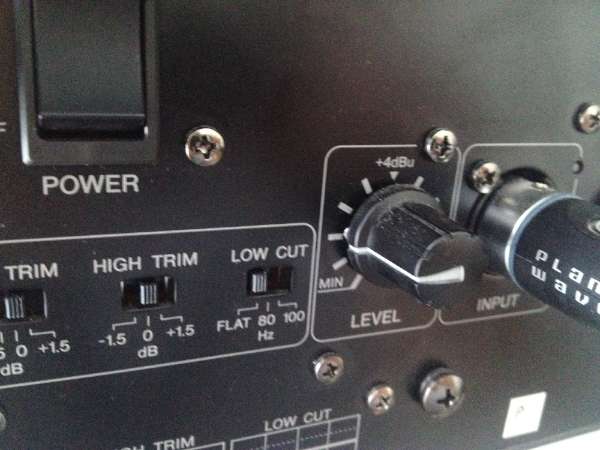
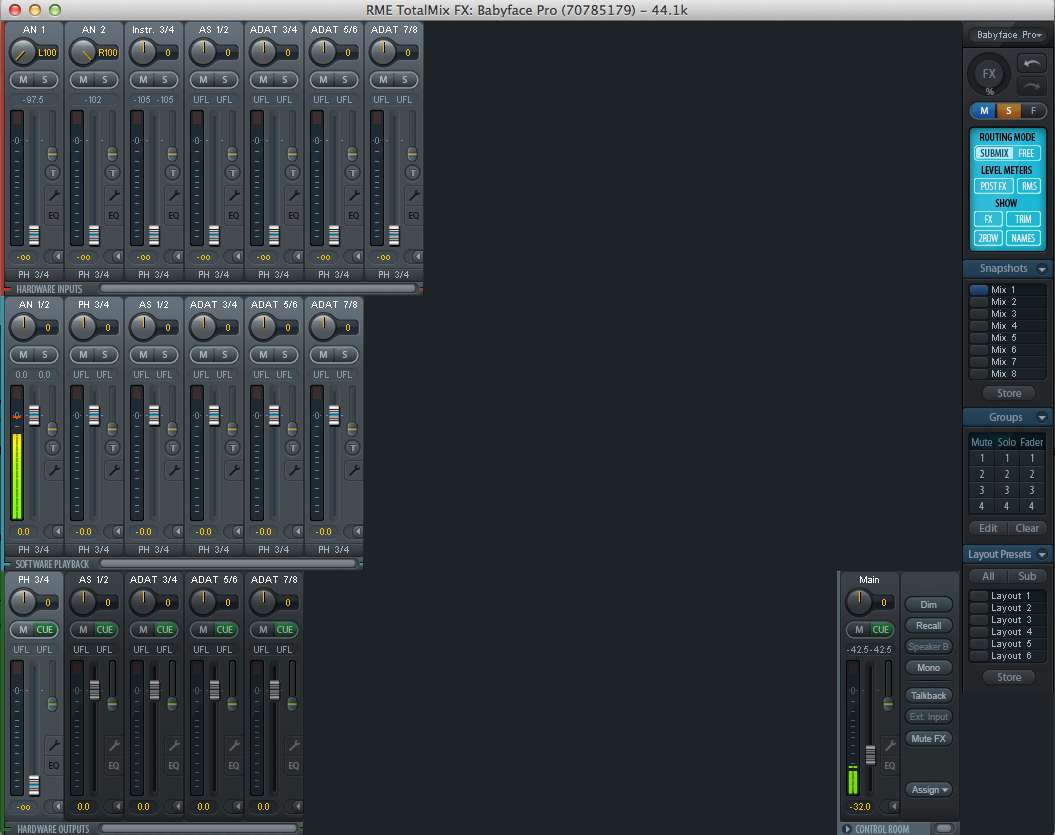
It's the usual level reference mismatch. When you play music via the BF Pro how far do you have to turn down the faders in TotalMix? That is the problem. Loud listening should be around 0 dB. Most probably now it is -10 or lower. That means the 'normal' low volume on/off noise is amplified and played back much too loud.
You have to change the sensitivity of the monitors (or the amp used for them) so that they get less sensitive for the BF Pro output, which is at +19 dBu (your monitors most probably only need +4 dBu).


what i'm doing wrong?
MC, could you point the right settings on both monitors and totalmix?
does any other BF you've tested had such sound while turning off?
I need an exactly answer because now I want my BF be exchanged with normally working one.
The Babyface Pro is in. Love it. I bought a 6800mah 12v battery. Any idea how long I can run the unit with this battery. I did 1 full discharge cycle. Seemed like a very long time. I watched it for 12 hours and it seemed to be working just fine still. Also, I think my Note 4 can power it. At least it seemed to be working with just the Note 4 and and the babyface pro connected. that seemed odd. Any idea about that?
Lastly, CC mode is working with the Note 4 and the Audio Evolution app. tested and working with the Evolution USB driver. I did not test with the Android USB driver.
So the inputs 3 & 4 of Babyface Pro are True Line inputs (in terms of design they are not connected with the internal preamps anyway) but they are unbalanced. Am I right?
You are right, 3/4 are unbalanced. Note that 1/2 operate perfectly as line inputs as well. Balanced and unbalanced.
Hello there,
I got delivered the Babyface Pro. Originally packed and without damage. But the big button and a metal piece were outside. But that's not normal, right?

I tried to push him in but he does not sit more solid. Every time you turn the button, he comes out again. :-(
Should I send the device back?
greetings
Rafig
I would not even waste my time asking here. Send it back, this is absolutely not normal and you shouldn't try to fix it by yourself.
Can I ask where you buy it?
I bought him from Poland. As already mentioned, the package was safely packed, original and not damaged.
Seller I have already written and waiting for instructions.
But quite another question:
The previous Babyface worked under Linux in CC mode (PC => Phone output) immediately. But the new version is not working. On the "out" side, I see the signal but Phone output (high level) is not working.

I mean the simple system sound such as browsers, youtube, etc. no longer works. Do I have the settings change anything?
greetings
Rafig
It's all in the manual.
Thanks Matthias, it works.
I'm a bit confused.
I cannot find any detailed information about Babyface Pro on http://www.rme-audio.de/en/products.php
Just a link to http://babyface.rme-audio.de saying I can pre-register to get information when it will be available in my country.
It seems that it has been out for sale for several months, so I don't understand why there is no information?
Or has it been withdrawn from selling due to problems? I have seen quite a few threads reporting hardware problems.
I was strongly consider to buy a Babyface Pro, but now I am a bit hesitant.
Hi, I bought RME Babyface Pro, everything works great, but every time I turn off the computer, Babyface does not turn off automatically. It is connected directly to a USB 2.0 on my laptop, it should not be turned off automatically Babyface Pro? I have to eject device manually as external disk drives. Does anyone help me? I have read automatically manual and there is nothing I have found on this topic. Thank you guys.
I´m not sure, but that sounds like your usb connection is programmed to load when computer is off
RME User Forum → FireWire & USB series → The official Babyface Pro Thread
Powered by PunBB, supported by Informer Technologies, Inc.