Topic: Hardware Inputs and Playback Channels Auto Panning - Why?

When I select a Hardware Output in TMFX 2.03, the panning settings change automatically across my Hardware Inputs and Software Playback channels. I do not recall this behavior in 1.x.

I am linking to a video demonstration. https://imgur.com/a/c1mlvrU

Too me, it is strange. For example, Selecting Hardware Output AN3 pans my two headphone Software Playback channels to the left (L100) as well as ADAT 3-16 but not ADAT 1/2. And my ADAT Hardware Inputs 9-16 also pan left while ADAT 1-8 remain centered.

My DAW (Cubase 15 Pro) also modifies the hardware channels in TMFX when setup for Direct Monitoring. When I toggle a track's monitoring on in Cubase, TMFX sets the corresponding Hardware Input to 0. When I toggle the monitoring off on that track in Cubase, the corresponding Hardware input drops to -00 and then pans to R100. Arming the monitoring again re-centers the panning and once again raises the slider to 0.

Between what is demonstrated in the video clip and my described behavior in Cubase, can anyone tell me if this is normal? Can TMFX be set to a manual mode so no changes occur to my set snapshots regardless of selected Hardware Output?

Quite possibly I am not thinking about this correctly and there are good reasons for this behavior.

Thanks for any insight.

Re: Hardware Inputs and Playback Channels Auto Panning - Why?

The routing and mix changes for each individual hardware output, because that's how TMFX works, and that's how things are configured in your setup. Look at the matrix view for an overview. You can reset Totalmix to start from scratch. Save the current configuration if you think you might still need it.

Regards
Daniel Fuchs
RME

Re: Hardware Inputs and Playback Channels Auto Panning - Why?

Thanks Daniel, can you confirm if I reset all that I will be able to reconfigure the Ufx so that it essentially makes no volume or panning changes regardless of which output I select unless I do it manually?

Would you also know if this was the default set with v2.03? I know that I never set it up this way.

I'll dive into this later. Thx.

Re: Hardware Inputs and Playback Channels Auto Panning - Why?

The changes only affect the routing to the selected channel.
The video resolution isn't great, not easy to see detail, but doesn't look like a default configuration.

Regards
Daniel Fuchs
RME

5 (edited by miguel_cullera 2026-10-22 01:57:35)

Re: Hardware Inputs and Playback Channels Auto Panning - Why?

I did a full reset and manually rebuilt all my Channel Layouts. This resolved all but one issue which is when Cubase is setup for Direct Monitoring.

When I click the monitoring icon on an armed audio track in Cubase, the corresponding Hardware Input in TMFX jumps to 0.

In my case, this example is a stereo AES input coming out from an Axe FX III.

What happens is that any pre direct-monitoring volume I set in TMFX, will jump its level to 0. Then when I turn off the monitoring on the track, the corresponding Hardware Input drops fully to -00, and pans to R100.

Previously my direct monitoring Hardware Input settings in TMFX were unaltered regardless of turning on monitoring or not on a Cubase audio track. Possibly this is something Cubase is sending to the UFX III?

This has not been happening for too long. I correlated it with going to TMFX 2.03 but can't rule out a fairly recent minor patch to Cubase.

Anything on the UFXIII/TMFX side I can set to tell it to ignore any system requests to the Input Channels? Thx!

Demo: https://imgur.com/a/1C3loIK

6

Re: Hardware Inputs and Playback Channels Auto Panning - Why?

This is called ASIO Direct Monitoring (ADM). You can disable it in both Cubase and in TM FX if you don't like it.

Regards
Matthias Carstens
RME

Re: Hardware Inputs and Playback Channels Auto Panning - Why?

So the panning to the right when monitoring is clicked off is normal?

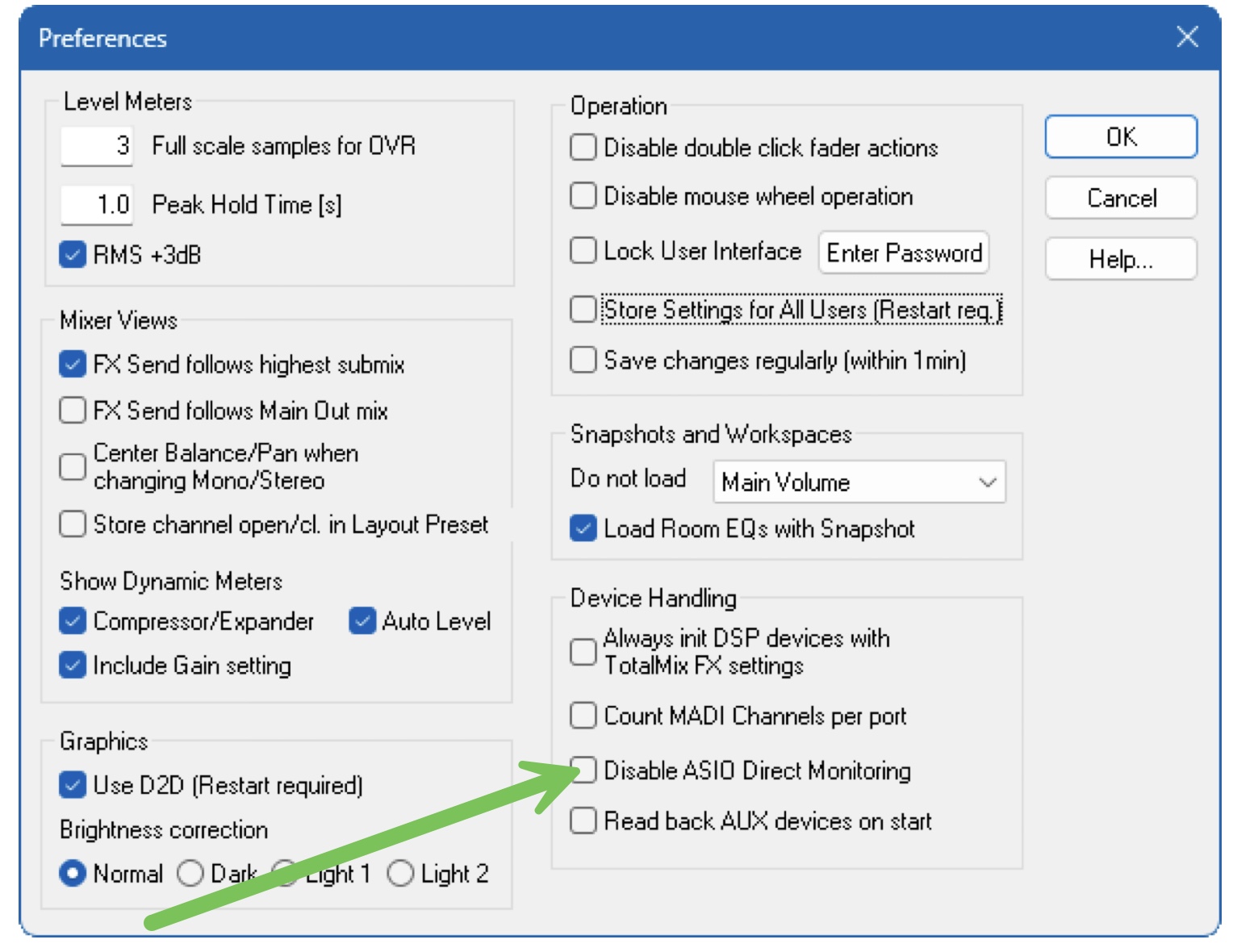
I looked for the setting to turn it on or off in TMFX to test but cannot find the setting. Can you point me to it in TMFX? Thx.

8 (edited by waedi 2026-10-23 17:32:09)

Re: Hardware Inputs and Playback Channels Auto Panning - Why?

miguel_cullera wrote:

So the panning to the right when monitoring is clicked off is normal?

Page 28 in the user manual :

RME devices support ASIO Direct Monitoring (ADM). Please note that not all programs support
ADM completely or error-free. The most often reported problem is the wrong behaviour of pano-
rama in a stereo channel. Also try to avoid setting the TotalMix FX hardware outputs (third row)
to mono mode. This will most likely break ADM compatibility.


miguel_cullera wrote:

I looked for the setting to turn it on or off in TMFX to test but cannot find the setting. Can you point me to it in TMFX? Thx.

In the Totalmix preferences :

https://i.ibb.co/WpVW7d2R/adm.jpg

M1-GoldenGate, Madiface Pro, Digiface USB, Babyface silver and blue

Re: Hardware Inputs and Playback Channels Auto Panning - Why?

Thanks. I think I prefer having it enabled but the panning thing is weird. I have to manually center panning anytime I want to just monitor the input directly from TMFX.

Re: Hardware Inputs and Playback Channels Auto Panning - Why?

miguel_cullera wrote:

Thanks. I think I prefer having it enabled but the panning thing is weird. I have to manually center panning anytime I want to just monitor the input directly from TMFX.

You can route the input to the headphone output and listen directly without DAW and with almost zero-latency.
In the DAW track let direct monitoring off.

M1-GoldenGate, Madiface Pro, Digiface USB, Babyface silver and blue

11

Re: Hardware Inputs and Playback Channels Auto Panning - Why?

miguel_cullera wrote:

Thanks. I think I prefer having it enabled but the panning thing is weird. I have to manually center panning anytime I want to just monitor the input directly from TMFX.

Panning issues typically show up when Cubase channels are different to TM FX channels, in regard to Mono/Stereo. Simply set it identical. Also note the info in the manual about default configuration for ADM (see also Options - Reset Mix and look out for 'ADM').

Regards
Matthias Carstens
RME