Topic: RME Control 1.0-beta (Windows)
System tray application for controlling RME audio interfaces via TotalMix FX.
Works via Global OSC only with TotalMix 2.1+
The app is in early development, so you might encounter bugs and unstable performance.
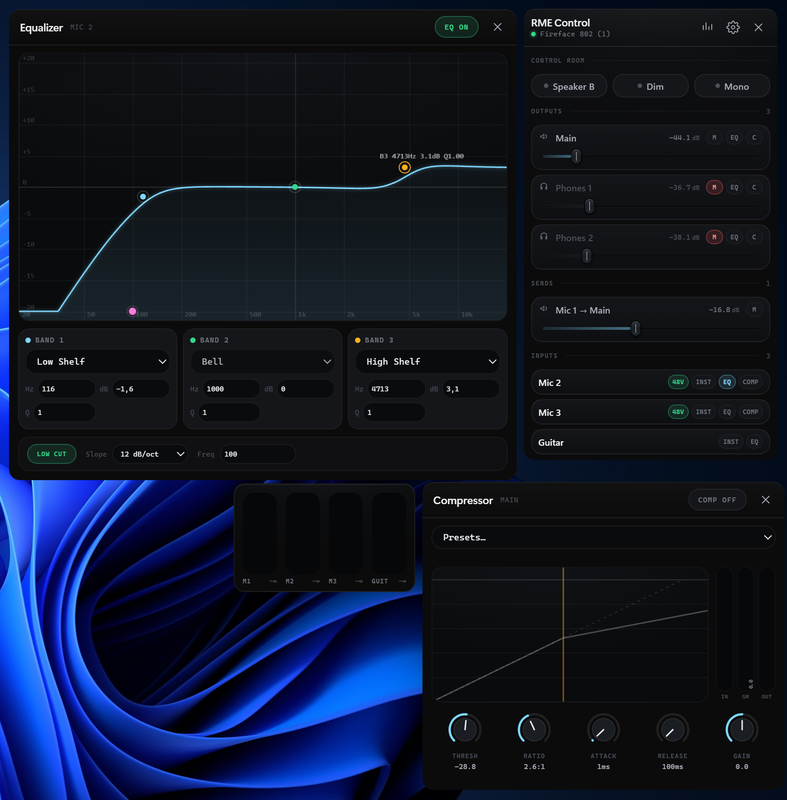
Audio Outputs Control & Monitoring
* Volume control for any outputs (including Main Out and headphones) via Windows multimedia volume keys or the system tray icon.
* Adjustable volume step size ranging from 1 to 10 dB.
* Dim/Mute function using the Windows mute key.
* Added a setting to toggle whether adjusting the volume unmutes the output.
* Mono switch via the SHIFT + CTRL + M hotkey.
* Speaker B button for switching to an alternative pair of monitors.
* Quick audio output switching for volume keys using the Alt + Up/Down Arrow shortcut.
* Added an option where activating an output via Alt + Up/Down Arrow mutes all other outputs except the active one (highly useful for mixing and production).
* Channel editing with the ability to modify existing input and output channels or add new ones.
* Creating sends from input channels to output channels.
Inputs Control
* Phantom power (+48V) control for any number of input channels.
* Instrument mode toggle for any number of input channels.
* Convenient EQ and compressor control.
Interface, Notifications & Customization
* Dedicated always-on-top window for input level monitoring.
* Clipping notifications to prevent signal overload.
* On-screen notifications for volume changes, Dim, Mono, and Mute (these appear even when values are modified directly in TotalMix, and the Mute notification displays the specific output name).
* Customizable application menu.
* Preset system to save and restore all application settings.
TotalMix Integration & Synchronization
* Full two-way synchronization as the application reads values from TotalMix at startup and maintains a stable connection.
* Fail-safe disconnection behavior that freezes values and reverts Windows volume keys to native system behavior when TotalMix or the audio interface is disconnected.
* OSC monitor in the Connection section to track network commands.
Remote Control
* Built-in web server launched within your home network via a single "HTTP server" toggle in the settings.
* Quick QR code connection that opens a full RME remote control right in a mobile browser when scanned with a phone or tablet on the same Wi-Fi network.
TotalMix setup:
1. Set OSC Host to 127.0.0.1, ports to 7001 / 9001.
2. OSC Mode: Options → Mixer Settings → OSC → Compatibility (Mode): Global OSC
3. Enable Send Status
4. Enable Send level data
5. Enable Peak hold
6. Enable Send all data on start
Important! For the inputs and outputs to function correctly, the OSC addresses must be configured properly. Below is a guide on exactly how to do this:
1. Open the OSC monitor in RME Control
2. Move the corresponding knob or fader in TotalMix.
3. Check the displayed OSC address for this specific control element.
4. Copy or note down this address.
5. Go to the application settings, open the Routing section, and enter the obtained OSC address into the corresponding field.
Download RME Control
https://drive.google.com/drive/folders/ … sp=sharing
Enjoy, friends!