Topic: UFX III - need to exit and reenter Zoom for audio to pass?

Hi, I'm using a UFX III and for Zoom calls, I have to enter the call, exit (or have the other person exit), and reconnect before the audio will pass through to me. The other person seems to hear it on the first try. Sorry for the somewhat vague details, but I have Loopback enabled through an unused ADAT channel and since it does work eventually, might be setup OK?

UFX III | Logic 12.2 | Mainstage 4.0 | Sequoia 15.7.5 | MBP Jan 2023 16" M2 Pro 12/19 | 32GB RAM
2 (edited by waedi 2026-10-06 19:53:39)

Re: UFX III - need to exit and reenter Zoom for audio to pass?

Zoom and other video conference tools are very clumsy when it comes to multichannel audio interfaces drivers.

I'm not surprised you have to stop and play to force Zoom adapting to the driver.

Your setup with Totalmix seems to be correct.

You can do a test with aggregate device.

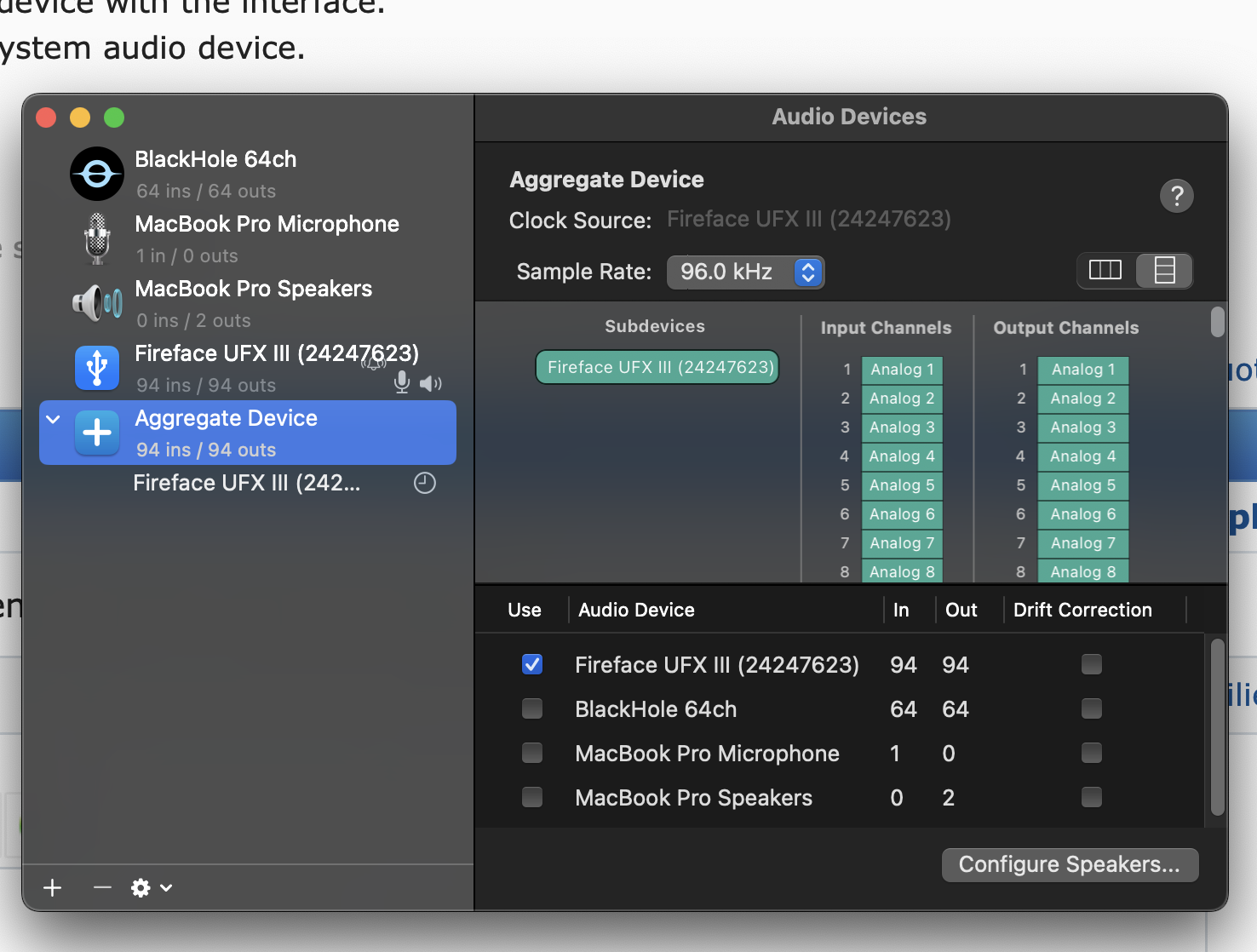
In the Audio-Midi-Setup create an aggregate device with the interface.
Use this in the system preferences Audio as system audio device.

Test if Zoom does hook up more directly...?

M1-GoldenGate, Madiface Pro, Digiface USB, Babyface silver and blue

Re: UFX III - need to exit and reenter Zoom for audio to pass?

Thanks, is there any way to post a screenshot of my settings for the aggregate to make sure it is proper?

UFX III | Logic 12.2 | Mainstage 4.0 | Sequoia 15.7.5 | MBP Jan 2023 16" M2 Pro 12/19 | 32GB RAM

Re: UFX III - need to exit and reenter Zoom for audio to pass?

Yes, you have to upload the screenshot to the internet.
I use free public image service imgbb.com

Upload the image and it returns a link to you.
Open the link in your browser,
right-click the image
copy image address
paste image address between img tags in the forum post.

M1-GoldenGate, Madiface Pro, Digiface USB, Babyface silver and blue

5 (edited by skillzmcgavern 2026-10-06 20:43:20)

Re: UFX III - need to exit and reenter Zoom for audio to pass?

https://i.ibb.co/rGHLXrYH/UFX-III-aggregate.png

UFX III | Logic 12.2 | Mainstage 4.0 | Sequoia 15.7.5 | MBP Jan 2023 16" M2 Pro 12/19 | 32GB RAM

6 (edited by waedi 2026-10-06 20:54:22)

Re: UFX III - need to exit and reenter Zoom for audio to pass?

Screenshot is top.
And it looks all good.
You are allowed to give the Aggregate device a user name instead of "Aggregate device" for example "Zoom Test"

next step

MacOS system preferences  / Audio
Output and Input : select the Aggregate device.

M1-GoldenGate, Madiface Pro, Digiface USB, Babyface silver and blue

Re: UFX III - need to exit and reenter Zoom for audio to pass?

I'm on Zoom calls once a week where I'm trying to use this, so I'll be trying again today, with the aggregate device selected, and report back.

UFX III | Logic 12.2 | Mainstage 4.0 | Sequoia 15.7.5 | MBP Jan 2023 16" M2 Pro 12/19 | 32GB RAM

Re: UFX III - need to exit and reenter Zoom for audio to pass?

Currently in the Zoom call, neither Fireface UFX III nor Aggregate Device are working for hearing my client's audio. "Test Speaker" works fine but I can't hear them at all, even if entering/reentering. Not sure what is happening.

UFX III | Logic 12.2 | Mainstage 4.0 | Sequoia 15.7.5 | MBP Jan 2023 16" M2 Pro 12/19 | 32GB RAM

9 (edited by waedi 2026-10-28 09:48:14)

Re: UFX III - need to exit and reenter Zoom for audio to pass?

Inside Zoom, Zoom settings / Audio
"Use specific audio input channels"

There should be a list of channels, make sure to enable the correct input channel.

M1-GoldenGate, Madiface Pro, Digiface USB, Babyface silver and blue

Re: UFX III - need to exit and reenter Zoom for audio to pass?

Correct input channel, meaning, the vocal mic? It'd be good if they could also hear my system sounds/other instruments on other channels of the UFX.

UFX III | Logic 12.2 | Mainstage 4.0 | Sequoia 15.7.5 | MBP Jan 2023 16" M2 Pro 12/19 | 32GB RAM

11 (edited by waedi 2026-10-28 19:09:44)

Re: UFX III - need to exit and reenter Zoom for audio to pass?

No what I meant was the input for their voice as I expect it has to be available somewhere, ma by its on one of those inputs.
And yes, there may be also your inputs from the interface to make them available for the others in the meeting.

The output of Zoom seems to be a mixdown of everything, for you on playback channels 1/2 fix.
You will not be able to control volume of different meeting users independent.

The audio from those members has to arrive into Zoom directly, not over your interface.

It is possible, a member has not activated his own input ?

M1-GoldenGate, Madiface Pro, Digiface USB, Babyface silver and blue

Re: UFX III - need to exit and reenter Zoom for audio to pass?

It's possible my client has issues with the mic/input not activating...we've tried turning stuff off/on in session, but that hasn't worked. Exiting session and reentering was working several weeks ago, but not (reliably) now. Trying again on Tues Nov 3, will report back then. What's weird is everything is good when not running UFX, and just going through system audio.

UFX III | Logic 12.2 | Mainstage 4.0 | Sequoia 15.7.5 | MBP Jan 2023 16" M2 Pro 12/19 | 32GB RAM

Re: UFX III - need to exit and reenter Zoom for audio to pass?

Currently in session. Aggregate Device did not pick up mic signal, but selecting UFX III as device did (Input 1). Couldn't hear client's audio, but heard it upon exiting and reentering (did not do anything else in that changeover). Don't have a great testing setup but if there's a way to "test" the particular Zoom setup and not just monitor that in a DAW (which doesn't seem the same) I will work on it.

UFX III | Logic 12.2 | Mainstage 4.0 | Sequoia 15.7.5 | MBP Jan 2023 16" M2 Pro 12/19 | 32GB RAM

14 (edited by waedi 2026-11-04 01:13:14)

Re: UFX III - need to exit and reenter Zoom for audio to pass?

You can sort out the aggregate device, the test has shown it has no benefit.

One further test I can think of is checking out different conference tools.
Unfortunately you can't do this alone with one computer, you may ask someone to help you by doing a conference.
I would try Google-Meet.
If I remember correct they did upgrade for multichannel audio.

M1-GoldenGate, Madiface Pro, Digiface USB, Babyface silver and blue

Re: UFX III - need to exit and reenter Zoom for audio to pass?

Cool, I'll look into that. For this client/situation we need to use Zoom as it integrates with the web browser - so might not be able to suss it out for this circumstance. I couldn't find the list of channels you had described prior, even though I did see it one time - I think maybe that is due to Zoom running within the browser rather than standalone as well?

UFX III | Logic 12.2 | Mainstage 4.0 | Sequoia 15.7.5 | MBP Jan 2023 16" M2 Pro 12/19 | 32GB RAM

Re: UFX III - need to exit and reenter Zoom for audio to pass?

skillzmcgavern wrote:

due to Zoom running within the browser rather than standalone as well?

This is possible, may be there is audio settings in the browser preferences ?

M1-GoldenGate, Madiface Pro, Digiface USB, Babyface silver and blue

Re: UFX III - need to exit and reenter Zoom for audio to pass?

I'm running Safari v27.0 on Mac - no audio settings/preferences available from what I see, it just goes by system setting I think.

UFX III | Logic 12.2 | Mainstage 4.0 | Sequoia 15.7.5 | MBP Jan 2023 16" M2 Pro 12/19 | 32GB RAM